
The 6:00 PM Problem: How a Grocery App Lost Orders With Auto Scaling Turned ON
Shiv Srivastava
Product Architect & Founder · AdvikPrep
This is a composite story built from patterns many teams run into. "FreshCart" and its numbers are made up for teaching. Prices are approximate US on-demand rates, so check your own region.
Meet FreshCart
FreshCart is a small grocery delivery app run by a team of two engineers. Every evening around 6 PM, people finish work and open the app to order dinner. Traffic goes from calm to crazy in minutes.
Their AWS Setup (In Plain English)
Here is how a customer's order travels through FreshCart's system:
Customer's phone
      ↓
Load Balancer (ALB): the receptionist, sends each visitor to a free app copy
      ↓
ECS Tasks: the app copies (containers) that handle each request
      ↓
EC2 Servers: the machines where those app copies live
      ↓
Database (RDS): where orders and customers are stored
Think of a restaurant:
- The load balancer is the host at the door, sending guests to open tables.
- The tasks are the waiters, each serving customers.
- The EC2 servers are the dining rooms where waiters can work.
- The database is the kitchen.
FreshCart's numbers:
- 6 servers (m5.xlarge, 4 vCPU each)
- Each task uses 1 vCPU, so one server holds 4 tasks
- Total: 24 task slots
They also had two separate auto scaling settings:
- ECS Service Auto Scaling: adds more tasks (waiters) when tasks get busy
- EC2 Auto Scaling: adds more servers (rooms) when servers get busy
Why the Team Was Relaxed
For months, FreshCart's tech team slept well, and they had good reasons:
- Both auto scaling settings were turned on, and the dashboard showed green.
- Their evening rush needed about 18 to 20 tasks, which fit comfortably in 24 slots.
- Traffic had grown slowly, so the servers always had time to catch up.
- Their load test passed. They were confident.
The founder even joked: "Auto scaling is ON. We can go to sleep."
The Night It Broke
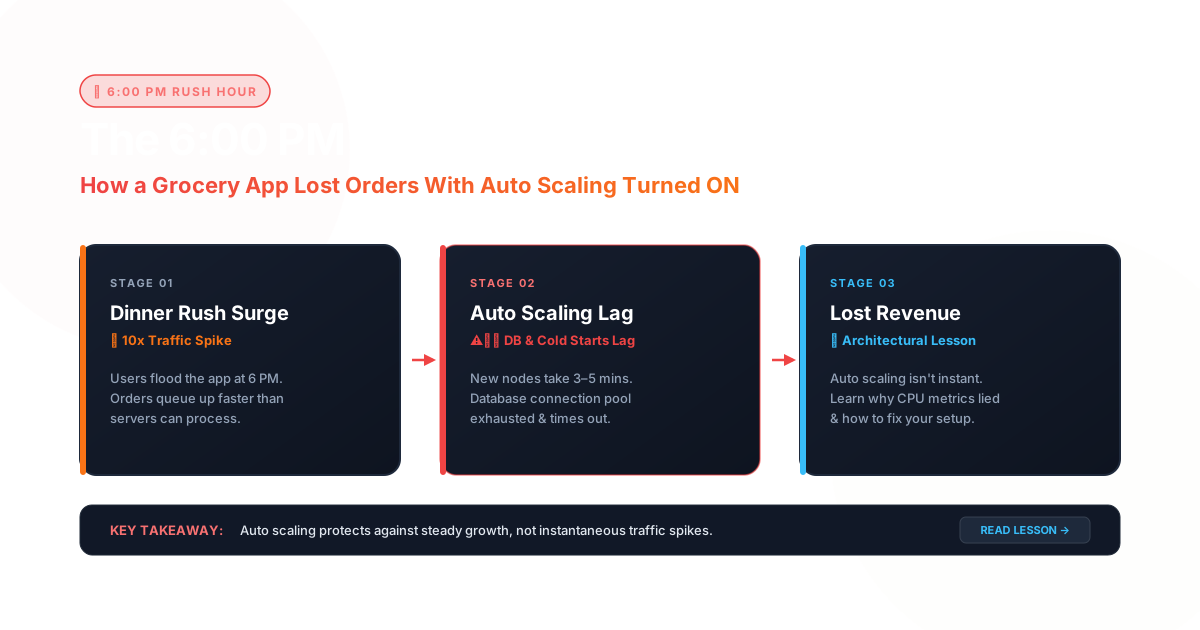
Then a food blogger's video about FreshCart went viral. New users poured in, and the daily 6 PM rush doubled. The app suddenly needed 40 tasks, but the servers only had room for 24.
Checkout started timing out. Customers left. Support got angry messages. And the founder asked the question that made this story worth telling:
"But auto scaling is ON. Why didn't it work?"
Step 1: Follow the Pain, Not the Dashboard
The team resisted the urge to guess. They didn't blame the code or the database. Instead they played detective and followed the customer's request from the front door to the back, asking one simple question at each stop.
Stop 1: Where do customers feel the pain?
- They checked: the load balancer graphs.
- They saw: slow responses and error messages (5xx) starting at exactly 6:00 PM.
- It meant: the problem is real and it started with the rush.
Stop 2: Did the app ask for more copies?
- They checked: ECS Service Auto Scaling activity.
- They saw: yes, within about a minute it asked for 40 tasks.
- It meant: task scaling was doing its job. It was not the problem.
Stop 3: Did those copies actually start?
- They checked: the ECS service page.
- They saw: only 24 tasks running, and 16 tasks stuck in "PENDING".
- It meant: the app asked for waiters, but they were standing outside.
Stop 4: Why are they stuck?
- They checked: the ECS service events log.
- They saw: the message "no container instance met all requirements."
- It meant: all 24 slots were full and there was no room for anyone else.
The finding: the bottleneck was not the code, not the database, and not task scaling. The servers were arriving too late.
Step 2: Do the Math on the Pain
Next they asked: how late are the servers?
Their EC2 Auto Scaling had this rule: "Add a server when server CPU stays above 70% for three checks, and each check happens every 5 minutes."
- Waiting for the rule to trigger: 3 × 5 = 15 minutes
- Booting the new server: about 5 minutes
- Time until the first extra server helps: about 20 minutes
They needed 4 extra servers, and every one of them was 20 minutes away. Meanwhile, 24 slots were doing the work of 40:
Extra load on each running task = 40 ÷ 24 = 1.67 times A task that normally runs at 60% CPU now needs 60% × 1.67 = 100%
Every running task was maxed out, and customers saw timeouts.
Their real problem was speed. Tasks scale in seconds, but servers scale in minutes. Nobody had noticed that mismatch because traffic used to grow slowly.
Step 3: Three Possible Fixes
First, they measured a typical day:
| Time | Hours | Tasks needed |
|---|---|---|
| 12 AM to 8 AM | 8 | 4 |
| 8 AM to 6 PM | 10 | 8 |
| 6 PM to 9 PM | 3 | 40 |
| 9 PM to 12 AM | 3 | 12 |
That adds up to 268 task-hours per day, or about 8,040 per month.
Fix A: "Just buy more servers." Keep 10 servers on all day. 10 × $0.192 × 24 × 30 = $1,382 per month It works, but only 268 of the 960 daily slot-hours get used, about 28%. They'd be paying for empty seats most of the day.
Fix B: Smarter EC2. Add an ECS Capacity Provider, so ECS tells the server group when it needs room, plus a schedule to add servers at 5:45 PM, before the rush. Server-hours per day: (8h × 2) + (10h × 2) + (3h × 10) + (3h × 3) = 75 75 × 30 = 2,250 server-hours × $0.192 = $432 per month Add a 25% safety buffer and it's about $540 per month.
Fix C: Move the web tier to Fargate. Fargate charges per task per second and has no servers to boot. 1 vCPU + 2 GB costs about $0.04048 + (2 × $0.004445) = $0.0494 per hour 8,040 task-hours × $0.0494 = about $397 per month
The Scoreboard
| Option | Monthly cost | 6 PM spike handled? |
|---|---|---|
| Today (6 servers always on) | about $830 | No, 20 minutes of pain |
| A: 10 servers always on | $1,382 | Yes, but wasteful |
| B: Smart EC2 | about $540 | Yes, with careful tuning |
| C: Fargate | about $397 | Yes, tasks start in about a minute |
Why Fargate Won Here
A perfectly packed EC2 server costs $0.192 ÷ 4 = $0.048 per task-hour. Fargate costs $0.0494, only about 3% more.
But nobody packs servers perfectly. FreshCart's traffic is spiky, so EC2 servers sit half-empty most of the day. Fargate wins because it doesn't charge for empty seats. It also removed server patching and capacity planning, so the two-person team could spend that time on the app.
When the Answer Would Flip
- Flat, heavy traffic all day: servers stay full, so EC2 with Savings Plans can beat Fargate.
- GPUs or special hardware: you need EC2.
- A hybrid can be cheapest: a small EC2 base for the always-on load, with Fargate for the spikes. It saves money but takes more work to run.
The Lessons
- Auto scaling ON doesn't mean auto scaling READY. Always ask how long it takes to react.
- Find the bottleneck by following the request. Customer, then load balancer, then tasks, then servers.
- If you know when the rush comes, don't wait for a metric. Schedule it.
- Idle capacity is the hidden bill. Compare options by how full your servers are, not by price per hour.
Your Turn 👇
- Have you ever seen tasks stuck in PENDING during a traffic spike? What did you find?
- Is your production on Fargate or EC2, and would you switch?
- Do you pre-warm for known rushes, or let auto scaling figure it out?
Repost this for the teammate who says "we have auto scaling, we're fine."
#AWS #ECS #Fargate #DevOps #AutoScaling #CloudCost
Here are both parts, written for LinkedIn. Part 1 ends at the PENDING reveal with a specific question, and Part 2 opens with a recap. I've used emojis and plain text instead of tables and code blocks, because LinkedIn doesn't render Markdown.
Part 1
🛒 The 6 PM Problem: a grocery app lost orders with Auto Scaling turned ON
(A composite story built from patterns many teams hit. Names and numbers are made up for teaching.)
Meet FreshCart, a small grocery delivery app run by 2 engineers. Every evening at 6 PM, people finish work and order dinner. Traffic jumps in minutes.
Their AWS setup, in restaurant terms:
Customer ↓ Load Balancer → the host at the door ↓ ECS Tasks → the waiters (app copies) ↓ EC2 Servers → the dining rooms ↓ Database → the kitchen
Think of a restaurant:
- The load balancer is the host at the door, sending guests to open tables.
- The tasks are the waiters, each serving customers.
- The EC2 servers are the dining rooms where waiters can work.
- The database is the kitchen.
FreshCart's numbers:
- 6 servers (m5.xlarge, 4 vCPU each)
- Each task uses 1 vCPU, so one server holds 4 tasks
- Total: 24 task slots
They also had two separate auto scaling settings:
- ECS Service Auto Scaling: adds more tasks (waiters) when tasks get busy
- EC2 Auto Scaling: adds more servers (rooms) when servers get busy
Why the Team Was Relaxed
For months, FreshCart's tech team slept well, and they had good reasons:
- Both auto scaling settings were turned on, and the dashboard showed green.
- Their evening rush needed about 18 to 20 tasks, which fit comfortably in 24 slots.
- Traffic had grown slowly, so the servers always had time to catch up.
- Their load test passed. They were confident.
The founder even joked: "Auto scaling is ON. We can go to sleep."
The Night It Broke
Then a food blogger's video about FreshCart went viral. New users poured in, and the daily 6 PM rush doubled. The app suddenly needed 40 tasks, but the servers only had room for 24.
Checkout started timing out. Customers left. Support got angry messages. And the founder asked the question that made this story worth telling:
"But auto scaling is ON. Why didn't it work?"
The team didn't guess. They followed the customer's request from the front door to the back:
🔎 Load balancer: slow responses and 5xx errors starting at exactly 6:00 PM 🔎 Task scaling: asked for 40 tasks within a minute, so it did its job 🔎 ECS service page: only 24 tasks running, 16 stuck in PENDING 🔎 Service events: "no container instance met all requirements"
Now it's your turn 👇 If you were on this team: 1️⃣ What would you check next? 2️⃣ What would your fix be?
Drop your answer in the comments. I'll share what FreshCart found, with the cost math, in Part 2 on [day].
#AWS #ECS #DevOps #AutoScaling #CloudEngineering
Part 2
🛒 The 6 PM Problem, Part 2: what FreshCart found (with the math)
Quick recap: a grocery app on ECS + EC2 had auto scaling ON, yet at the 6 PM rush 16 tasks were stuck in PENDING and checkout timed out. [Link to Part 1]
Many of you guessed the servers were the problem. Well done! 👏 (Add a shout-out to 1 or 2 commenters here.)
The finding: the bottleneck wasn't the code, the database, or task scaling. The servers were arriving too late.
Why? The math: Their server rule was: add a server when CPU stays above 70% for 3 checks, checked every 5 minutes. ⏱ Waiting: 3 × 5 = 15 minutes ⏱ Booting: about 5 minutes ⏱ Total: about 20 minutes for the first extra server
Meanwhile 24 slots did the work of 40: 40 ÷ 24 = 1.67x load per task A task normally at 60% CPU now needs 60% × 1.67 = 100%
Tasks scale in seconds. Servers scale in minutes. Nobody noticed because traffic used to grow slowly.
Their typical day: 4 tasks (12 AM to 8 AM), 8 tasks (8 AM to 6 PM), 40 tasks (6 PM to 9 PM), 12 tasks (9 PM to 12 AM). That is about 8,040 task-hours per month.
Three fixes:
A. Just buy more servers. 10 servers always on = $1,382/month. It works, but only about 28% of the capacity gets used. You pay for empty seats.
B. Smarter EC2. Add a capacity provider plus a schedule that adds servers at 5:45 PM. That is 2,250 server-hours × $0.192 = $432, or about $540/month with a safety buffer.
C. Fargate. No servers to boot. 8,040 task-hours × $0.0494 = about $397/month.
Why Fargate won: A perfectly packed EC2 task costs $0.048 per hour, and Fargate costs $0.0494. That is only about 3% more. But nobody packs servers perfectly, and FreshCart's spiky traffic left servers half-empty. Fargate doesn't charge for empty seats.
When the answer flips: flat, heavy traffic all day (EC2 + Savings Plans wins), GPUs or special hardware (EC2 only), or a hybrid of a small EC2 base with Fargate for spikes.
4 lessons: 1️⃣ Auto scaling ON ≠ auto scaling READY. Ask how long it takes to react. 2️⃣ Find the bottleneck by following the request. 3️⃣ Know when the rush comes? Schedule it. Don't wait for a metric. 4️⃣ Idle capacity is the hidden bill.
(Prices are approximate US on-demand rates. Check your region.)
Your turn 👇 Fargate or EC2 in your production, and would you switch?
♻️ Repost for the teammate who says "we have auto scaling, we're fine."
#AWS #ECS #Fargate #DevOps #CloudCost
Length check: Part 1 is well under LinkedIn's roughly 3,000-character limit. Part 2 is close to it. If LinkedIn rejects it, cut the "when the answer flips" section, or publish Part 2 as a LinkedIn Article.
Image prompts
I can't generate a finished image in this chat. These prompts work in tools like Midjourney, DALL·E, Ideogram, or Canva AI. AI tools often garble text, so add the headline yourself in Canva. Use 1200×627 px (landscape) or 1080×1350 px (portrait).
Part 1 cover (the mystery):
Flat vector illustration, clean modern tech-blog style. A busy restaurant entrance at evening. A host with a tablet at the door, and a long line of small waiter characters waiting outside behind a glass wall, each holding a tray. Inside, the dining room is completely full. A glowing red "PENDING" sign floats over the waiting line. Warm orange and dark navy color palette, soft shadows, plenty of empty space at the top for a headline. No real text, no logos.
Part 2 cover (the answer):
Flat vector illustration, clean modern tech-blog style. A split scene: on the left, a tired stopwatch and a clock showing a slow "20 minutes" delay next to a building being constructed brick by brick. On the right, a bright open-air space where waiter characters appear instantly from small glowing bubbles. A rising bar chart in the background, the shortest bar highlighted green. Navy and green palette, soft shadows, empty space at the top for a headline. No real text, no logos.
Headline text to add yourself:
- Part 1: "Auto Scaling was ON. So why did 16 tasks get stuck?"
- Part 2: "The fix cost $397/month. The mistake cost far more."
I can also make a simple SVG version of the restaurant-style architecture diagram, which you could use as the Part 1 image. Want that?
🛒 The 6 PM Problem: a grocery app lost orders with Auto Scaling turned ON
A composite story built from patterns many teams hit. Names and numbers are made up for teaching.
Meet FreshCart, a small grocery delivery app run by 2 engineers. Every evening at 6 PM, people finish work and order dinner. Traffic jumps in minutes.
Their AWS setup, in restaurant terms:
Customer
↓
Load Balancer → the host at the door
↓
ECS Tasks → the waiters (app copies)
↓
EC2 Servers → the dining rooms
↓
Database → the kitchen
Think of a restaurant:
-
The load balancer is the host at the door, sending guests to open tables.
-
The tasks are the waiters, each serving customers.
-
The EC2 servers are the dining rooms where waiters can work.
-
The database is the kitchen.
FreshCart's numbers:
-
6 servers (m5.xlarge, 4 vCPU each)
-
Each task uses 1 vCPU, so one server holds 4 tasks
-
Total: 24 task slots
They also had two separate auto scaling settings:
-
ECS Service Auto Scaling: adds more tasks (waiters) when tasks get busy
-
EC2 Auto Scaling: adds more servers (rooms) when servers get busy
Why the Team Was Relaxed
For months, FreshCart's tech team slept well, and they had good reasons:
-
Both auto scaling settings were turned on, and the dashboard showed green.
-
Their evening rush needed about 18 to 20 tasks, which fit comfortably in 24 slots.
-
Traffic had grown slowly, so the servers always had time to catch up.
-
Their load test passed. They were confident.
The founder even joked: "Auto scaling is ON. We can go to sleep."
The Night It Broke
Then a food blogger's video about FreshCart went viral. New users poured in, and the daily 6 PM rush doubled. The app suddenly needed 40 tasks, but the servers only had room for 24.
Checkout started timing out. Customers left. Support got angry messages. And the founder asked the question that made this story worth telling:
But auto scaling is ON. Why didn't it work?
The team didn't guess. They followed the customer's request from the front door to the back:
🔎 Load balancer: slow responses and 5xx errors starting at exactly 6:00 PM
🔎 Task scaling: asked for 40 tasks within a minute, so it did its job
🔎 ECS service page: only 24 tasks running, 16 stuck in PENDING
🔎 Service events: no container instance met all requirements.
Now it's your turn 👇
If you were on this team:
1️⃣ What would you check next?
2️⃣ What would your fix be?
Drop your answer in the comments. I'll share what FreshCart found, with the cost math, in Part 2 in next 2 days.
#AWS, #ECS, #DevOps, #AutoScaling, #CloudEngineering
--
Ready to try AdvikPrep?
Practice with expert-curated exam sets, instant grading, and AI-driven insights. Free to start — no credit card required.