
The Tale of Two Dials: ECS Service Auto Scaling vs EC2 Auto Scaling
Shiv Srivastava
Product Architect & Founder · AdvikPrep
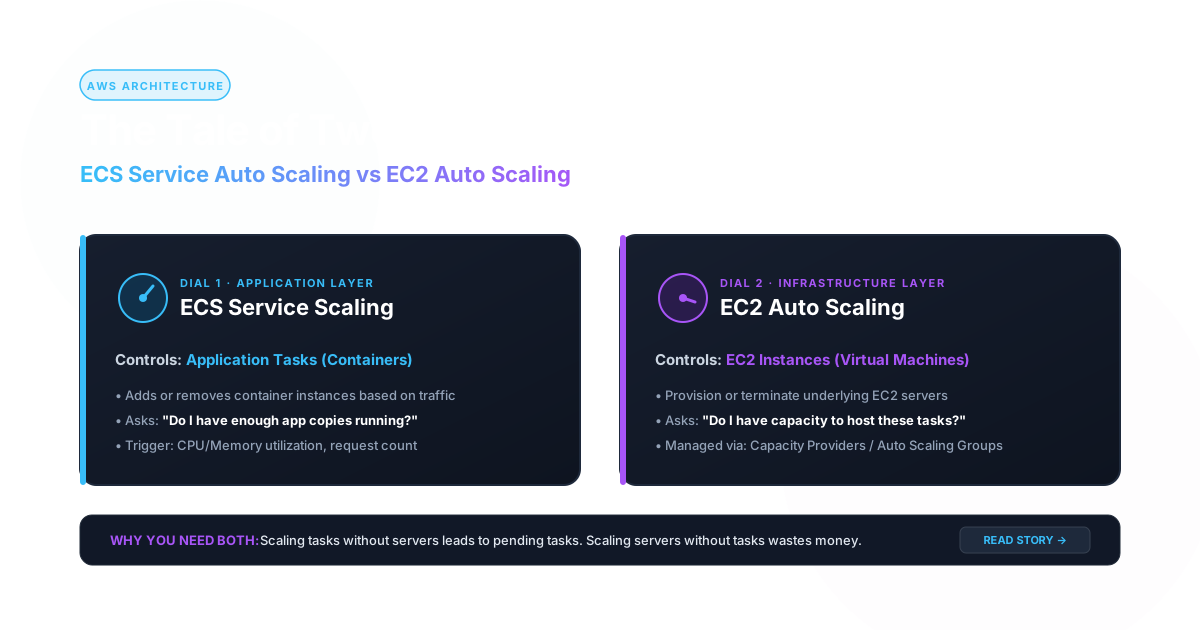
A story about a small online store, a nervous engineer, and the day the "Big Sale" almost broke everything.
Prologue: The Restaurant Analogy
Meet Maya, a junior engineer at QuickCart, a small online store. Her mentor, Ravi, draws a picture on the whiteboard before she touches anything:
"Think of a restaurant. Waiters serve customers. Tables and kitchen space are where the waiters work. If more customers arrive, you need more waiters. But if you run out of tables, extra waiters have nowhere to stand."
Then he writes two lines:
| In the restaurant | In AWS |
|---|---|
| Waiters (do the work) | ECS tasks (your running containers) |
| Tables and kitchen (the space) | EC2 instances (the servers) |
| Hiring more waiters | ECS Service Auto Scaling (changes the number of tasks) |
| Building more tables | EC2 Auto Scaling (changes the number of instances) |
"Two different dials," Ravi says. "Many outages happen because someone turned one dial and forgot the other. Let's walk through how."
Chapter 1: The Single Server Days (Basics)
QuickCart started with one EC2 instance running the website directly. When traffic grew, Maya's predecessor created an Auto Scaling Group (ASG):
- Minimum: 2 servers
- Maximum: 10 servers
- Rule: add a server when average CPU goes above 60%
This is EC2 Auto Scaling. It only knows about servers: launch one, terminate one, replace unhealthy ones. It has no idea what runs inside them.
It worked, but slowly. A new server takes a few minutes to boot, install software, and join the load balancer. And every server ran one copy of the app, so a small app wasted a big server.
Then the team moved to containers on ECS. Now one server can run many small tasks, and a new question appears:
"Which thing do I scale: the tasks or the servers?"
Answer: it depends on where your tasks run.
Chapter 2: The Easy Case, Fargate and ECS Service Auto Scaling
QuickCart's first containerised service, catalog-api, ran on Fargate. With Fargate there are no servers for Maya to manage, so there is only one dial: the number of tasks.
ECS Service Auto Scaling (powered by Application Auto Scaling) changes the service's desiredCount. You pick a metric and a target, and ECS does the rest.
# Tell AWS the allowed range
aws application-autoscaling register-scalable-target \
  --service-namespace ecs \
  --resource-id service/prod/catalog-api \
  --scalable-dimension ecs:service:DesiredCount \
  --min-capacity 2 --max-capacity 20

# Keep average CPU around 60%
aws application-autoscaling put-scaling-policy \
  --policy-name cpu60 \
  --service-namespace ecs \
  --resource-id service/prod/catalog-api \
  --scalable-dimension ecs:service:DesiredCount \
  --policy-type TargetTrackingScaling \
  --target-tracking-scaling-policy-configuration '{
    "TargetValue": 60.0,
    "PredefinedMetricSpecification":
      {"PredefinedMetricType": "ECSServiceAverageCPUUtilization"},
    "ScaleOutCooldown": 60,
    "ScaleInCooldown": 300
  }'
What happens: CPU climbs to 80%, so ECS adds tasks until the average falls back near 60%. Traffic drops, so tasks are removed slowly (the 300-second scale-in cooldown stops it from flapping up and down).
Maya is happy. Fargate starts tasks in tens of seconds, and she never thinks about servers.
Basic rules Maya learned
- Min capacity is your safety floor (never fewer than 2, so one AZ failure doesn't take you down).
- Max capacity is your wallet protection and your ceiling. Forget it and a bug can scale you into a huge bill. Set it too low and a sale gets throttled.
- Scale out fast, scale in slow. Adding capacity late hurts customers; removing it late only costs a little money.
Edge case 1: CPU is the wrong metric
catalog-api spends most of its time waiting on the database, so CPU stays low even while customers see slow pages. The service never scales.
Fix: scale on ALBRequestCountPerTarget (requests per task), which tracks actual load for web services.
"PredefinedMetricSpecification": {
  "PredefinedMetricType": "ALBRequestCountPerTarget",
  "ResourceLabel": "app/prod-alb/abc123/targetgroup/catalog/def456"
},
"TargetValue": 500
Lesson: Pick the metric that moves first when users feel pain.
Chapter 3: The Two-Dial Problem, ECS on EC2
Months later, QuickCart's data team needs GPUs, and finance wants cheaper compute for steady workloads, so they run a second cluster on EC2 instances (the "EC2 launch type").
Now there are two layers:
Layer 1 (tasks):     ECS Service Auto Scaling   -> how many tasks?
Layer 2 (servers):   EC2 Auto Scaling (ASG)     -> how many instances?
Maya sets up task scaling exactly like before. Then the first busy evening arrives.
The mystery of the stuck tasks
Task scaling did its job. It raised desiredCount from 4 to 12. But the dashboard showed:
Running: 6 Pending: 6
Six tasks sat in PENDING forever. Customers got errors.
Ravi looked at the service events:
service catalog-worker was unable to place a task because no container instance met all of its requirements. The closest matching instance has insufficient CPU units available.
What happened: ECS wanted 12 tasks, but the existing servers were full. ECS Service Auto Scaling only changes the task count. It does not create servers. The EC2 Auto Scaling group was still happily sitting at 2 instances, because average CPU of the instances looked fine (the tasks hadn't started, so nothing was using CPU yet).
Edge case 2: The deadlock. Tasks can't start without servers, and servers don't scale because the tasks haven't started using CPU. Scaling the ASG on host CPU can never solve this.
The fix: Capacity Providers with Managed Scaling
Ravi explains: "Don't scale servers by CPU. Scale them by how much room the tasks need."
An ECS Capacity Provider connects your ASG to ECS. With managed scaling turned on, ECS publishes a metric called CapacityProviderReservation and scales the ASG so tasks always have somewhere to land.
# 1. Create a capacity provider backed by the ASG
aws ecs create-capacity-provider \
  --name gpu-ec2-cp \
  --auto-scaling-group-provider '{
    "autoScalingGroupArn": "arn:aws:autoscaling:...:autoScalingGroup:...:autoScalingGroupName/ecs-asg",
    "managedScaling": {
      "status": "ENABLED",
      "targetCapacity": 85,
      "minimumScalingStepSize": 1,
      "maximumScalingStepSize": 10
    },
    "managedTerminationProtection": "ENABLED"
  }'

# 2. Attach it to the cluster and make the service use it
aws ecs put-cluster-capacity-providers \
  --cluster prod-ec2 \
  --capacity-providers gpu-ec2-cp \
  --default-capacity-provider-strategy capacityProvider=gpu-ec2-cp,weight=1
How it works in plain words:
- Task scaling raises
desiredCountto 12. - 6 tasks can't be placed, so ECS sees "I need more room".
CapacityProviderReservationgoes above the target.- The ASG launches instances. Tasks move from
PENDINGtoRUNNING.
targetCapacity: 85 means "keep the cluster about 85% full and leave about 15% headroom." That buffer means small bursts of new tasks start instantly on spare room instead of waiting minutes for a new server.
Chapter 4: The Comparison Ravi Draws
After the incident, Ravi writes a summary table on the whiteboard:
| ECS Service Auto Scaling | EC2 Auto Scaling (ASG) | |
|---|---|---|
| Scales | Number of tasks in a service | Number of instances in a group |
| Needed for Fargate? | Yes (the only one needed) | No (no servers to manage) |
| Needed for ECS on EC2? | Yes | Yes (usually via a capacity provider) |
| Reacts to | CPU, memory, request count per target, custom metrics, schedules | Instance metrics, or ECS demand via capacity provider |
| Speed | Seconds to tens of seconds (if capacity exists) | Minutes (boot + agent registration) |
| Failure mode | Tasks stuck PENDING if no room | Servers up but tasks not placed if misconfigured |
| Who it protects | Your application load | Your infrastructure room |
The golden rule: Task scaling decides how many waiters you need. Instance scaling makes sure there are enough tables. On Fargate, AWS handles the tables.
Chapter 5: The Queue Workers (Intermediate)
QuickCart sends order confirmation emails through an SQS queue, processed by a mailer-worker service. CPU is a poor signal here: a worker can be idle with 50,000 messages waiting.
Maya scales on backlog per task:
backlog per task = ApproximateNumberOfMessagesVisible / runningTaskCount
She publishes this as a custom CloudWatch metric and uses target tracking to keep it near, say, 100 messages per task (based on how long one message takes to process and how long she's willing to let customers wait).
Edge case 3: Scale-in kills a task mid-job
Traffic drops, ECS scales in, and it stops a worker that was halfway through sending a batch. The message returns to the queue later, and some customers get two emails.
Fixes (use them together):
- Make the worker idempotent (processing the same message twice is harmless).
- Handle
SIGTERM: stop taking new messages, finish the current one, then exit (and setstopTimeoutlong enough). - For long jobs, turn on ECS task scale-in protection: a worker marks itself protected while busy so scale-in can't pick it.
- Set the SQS visibility timeout longer than the job duration.
Lesson: Scaling in is more dangerous than scaling out. Always ask, "what if this task disappears right now?"
Chapter 6: Black Friday (Predictable Spikes)
QuickCart announces a midnight sale. Normally traffic doubles in minutes. Reactive scaling is always a little late (metric rises, alarm fires, tasks start, then servers boot).
Maya combines tools:
- Scheduled scaling raises the minimum task count at 11:30 PM, so capacity already exists when the rush begins.
- Target tracking handles anything above the plan.
- Capacity provider headroom (
targetCapacityaround 70-80 for the event) keeps spare room ready. - Scheduled action lowers the minimum again in the morning.
aws application-autoscaling put-scheduled-action \
  --service-namespace ecs \
  --scheduled-action-name pre-sale-warmup \
  --resource-id service/prod/catalog-api \
  --scalable-dimension ecs:service:DesiredCount \
  --schedule "cron(30 23 * * ? *)" \
  --scalable-target-action MinCapacity=12,MaxCapacity=60
Edge case 4: Scheduled actions and max-capacity
During testing, Maya forgot to raise the max along with the min. The sale started, load grew, and the service was stuck at the old maximum of 20, with no more tasks no matter how high the load went.
Lesson: Scaling can never exceed your configured max, and many other limits sit behind it (see next chapter).
Chapter 7: The Advanced Edge Cases
By now Maya can scale anything, so Ravi throws the nasty cases at her.
Edge case 5: The invisible limits
Scaling out only works if you aren't hitting a wall. Walls to check before the big day:
| Wall | Symptom | Fix |
|---|---|---|
Subnet IP addresses (each awsvpc task uses one IP) | Tasks fail to launch in a small subnet | Use larger or more subnets across AZs |
| ENI limit per EC2 instance | Few tasks fit per instance despite free CPU | Enable ENI trunking, or use bigger instance types |
| Fargate / EC2 vCPU quotas | Scale-out silently stops | Request quota increases early |
| Downstream limits (database connections, third-party APIs) | 20 tasks crash the DB | Pool connections, cap max tasks, use a proxy like RDS Proxy |
Real-world story: The service scaled to 40 tasks perfectly, and then the database ran out of connections, and everything failed. More app capacity made the outage worse. Scale the whole chain, not just one layer.
Edge case 6: Scaling in the servers while tasks are running
When the ASG scales in, it picks an instance to terminate, and that instance may be running important tasks.
Protection stack:
- Managed termination protection on the capacity provider (ECS only lets ASG terminate instances that have no non-daemon tasks).
- Lifecycle hook with instance draining, so tasks are moved off gracefully before shutdown.
- Spread tasks across instances so one instance's removal doesn't drop the whole service.
Edge case 7: Flapping (scale up, down, up, down)
A service oscillates every few minutes, causing churn, cold caches, and bills.
Causes and fixes:
- Cooldowns too short, so use a longer scale-in cooldown.
- Metric too noisy, so use a smoother metric or longer evaluation period.
- Target too tight, so give it a reasonable band.
- Slow-starting app counted as "healthy" too early, so tune the health check grace period and use warm-up.
Edge case 8: Slow starters hide behind fast scaling
New tasks need 90 seconds to warm up (loading caches, JIT). ECS added tasks, but they weren't ready, and the autoscaler saw high load and added even more tasks.
Fix: set healthCheckGracePeriodSeconds, use a longer scale-out cooldown, make the app start faster, and use the ALB's slow-start setting so new targets ramp up gradually.
Edge case 9: Spot interruptions plus scaling
To save money, Maya runs extra capacity on Fargate Spot (or Spot EC2). AWS can reclaim Spot capacity with a short warning (SIGTERM, then it's gone).
Safe pattern:
- Keep a base of on-demand tasks that can always serve traffic.
- Put burst capacity on Spot via capacity provider strategy (
baseandweight). - Keep workloads stateless and interruption-friendly.
Edge case 10: Daemon services and scaling
A log-shipper runs as a DAEMON service (one task per instance). You do not scale daemon services with Service Auto Scaling. Their count simply follows the number of instances, which the ASG controls.
Chapter 8: Which One Do I Use? (The Decision Guide)
Maya finally writes her own cheat sheet:
| Your situation | What to configure |
|---|---|
| Fargate web API | ECS Service Auto Scaling only (ALB request count per target) |
| Fargate queue worker | ECS Service Auto Scaling on backlog per task + scale-in protection |
| ECS on EC2 | ECS Service Auto Scaling plus a capacity provider with managed scaling on the ASG |
| Plain EC2 app (no containers) | EC2 Auto Scaling only |
| Known traffic spike | Scheduled scaling to raise min and max, plus reactive policies |
| Cost-sensitive, interruption-tolerant | Spot with an on-demand base |
The five-step mental check before any launch
- What am I scaling? Tasks, instances, or both?
- What signal reflects real user pain? (requests per task, queue backlog, latency, not just CPU)
- Is there room for new tasks? (capacity provider, subnet IPs, quotas, ENIs)
- What happens when I scale in? (SIGTERM, protection, idempotency)
- What downstream thing breaks first? (database, APIs, caches)
Epilogue
On the night of the sale, Maya watched the dashboard instead of sweating through it. Traffic tripled. Scheduled scaling had raised the floor, request-count tracking added tasks within seconds, the capacity provider kept 15% headroom for the cluster, and the database proxy absorbed the connection spike. At 2 AM everything scaled back in quietly, with no half-sent emails.
Ravi smiled: "Two dials. One tells you how many waiters; the other makes sure there are tables. Now you know when each one matters."
Quick Recap
- ECS Service Auto Scaling changes the number of tasks. Fast, and the only dial needed on Fargate.
- EC2 Auto Scaling changes the number of servers. Slower, and needed when you run ECS on EC2.
- On EC2, use a capacity provider with managed scaling so servers scale based on task demand, not host CPU.
- The classic trap is tasks stuck in
PENDINGbecause servers didn't scale. - Scaling in is riskier than scaling out: use SIGTERM handling, idempotency, task scale-in protection, and managed termination protection.
- Check the hidden limits: IPs, ENIs, quotas, and downstream dependencies.
Ready to try AdvikPrep?
Practice with expert-curated exam sets, instant grading, and AI-driven insights. Free to start — no credit card required.