
Multi-Turn Tool Chain Latency: Optimizing AWS Bedrock Agents
Shiv Srivastava
Product Architect & Founder · AdvikPrep
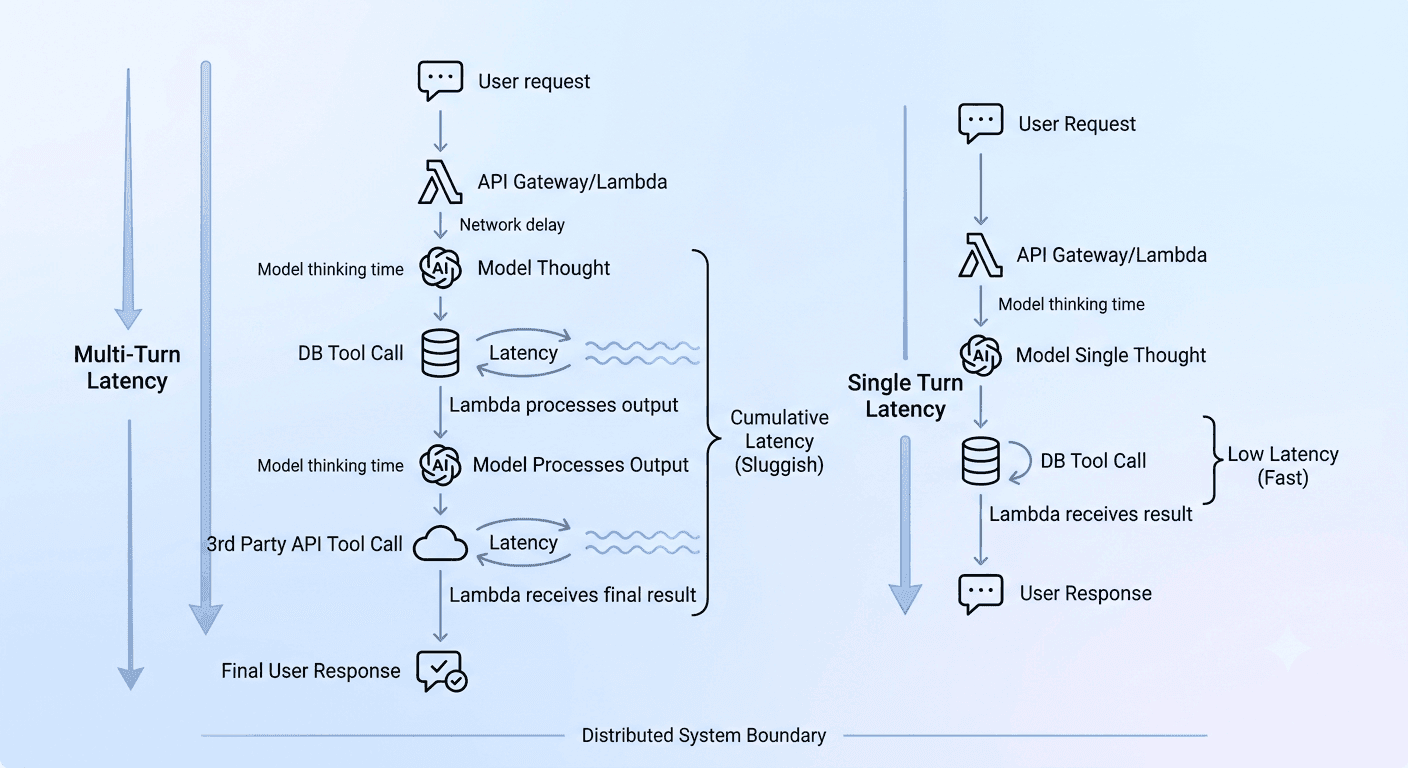
Multi-Turn Tool Chain Latency Challenge in AI Agents: A Beginner's Guide (with AWS CDK Hands-On)
Learn why AI agents feel slow when they call tools, then fix it yourself: a free 5-minute lab first, then a real AWS setup step by step.
Multi-turn tool chain latency is the delay a user feels when an AI agent has to call several tools, one after another, before it can answer. It is one of the most common reasons why AI agents, LLM tool calling (also called function calling or tool use) and agent loops feel slow. This guide explains the challenge in simple words, then lets you reproduce it and fix it yourself: first in a free 5-minute lab, then on real AWS infrastructure built step by step with the AWS CDK, AWS Lambda, the Amazon Bedrock Converse API and Amazon CloudWatch.
What you will learn
- Why an AI assistant that uses tools can feel slow
- Five simple fixes, and how much time each one saves
- How to run a small experiment on your own computer and watch the numbers change
- How to build the real thing on AWS, step by step (AWS CDK, Lambda, Amazon Bedrock, CloudWatch), and measure the difference
You need: Node.js 18 or newer on your computer. Part A (the lab) needs nothing else and costs nothing. Part B needs an AWS account with access to a model in Amazon Bedrock; it costs very little if you run the clean-up step at the end.
1. What is the multi-turn tool chain latency challenge?
Imagine you ask a shop assistant: "Where is my order, and can I return it?"
A slow assistant does this:
- Walks to the order desk. Comes back. Tells you the status.
- Walks to the shipping desk. Comes back.
- Walks to the returns desk. Comes back.
- Finally answers you.
A fast assistant sends three helpers to the three desks at the same time, then answers you once.
AI agents work the same way. A tool is just a function the AI can ask us to run, like "look up an order" or "check the return policy". The AI cannot run the tool itself. It asks, our code runs it, and we hand the result back.
One round of AI thinks → asks for a tool → we run it → we send the result back is called a turn. When the AI needs several tools one after another, that is a multi-turn tool chain:
User question
   → AI thinks (turn 1)  → asks for Tool A → we run Tool A
   → AI thinks (turn 2)  → asks for Tool B → we run Tool B
   → AI thinks (turn 3)  → asks for Tool C → we run Tool C
   → AI thinks (turn 4)  → final answer
Latency means waiting time. Every turn adds the AI's thinking time plus the tool's running time. In real systems one round trip often costs 1 to 3 seconds. Four turns can mean 8 seconds of the user staring at a blinking cursor.
Key idea: total wait = (number of AI turns × thinking time) + (time spent in tools). To make an agent faster, reduce one of those two things.
Key terms in simple words
| Term | Meaning in plain words |
|---|---|
| AI agent | A program where an AI model decides what to do next and can use tools to do it |
| Tool (function calling, tool use) | A function the AI can ask your code to run, such as "look up an order" |
| Agent loop / turn | One round: the AI thinks, asks for a tool, your code runs it, the result goes back to the AI |
| Multi-turn tool chain | Several turns in a row, because each tool call has to wait for the one before it |
| Latency | Waiting time, from the user's question to the answer |
| Parallel tool calling | Running tools that do not depend on each other at the same time |
| Token | A small piece of text the AI reads or writes. More tokens means slower and more expensive |
| p95 latency | 95 out of 100 requests were faster than this number. It shows your slow cases |
| Cold start | Extra start-up time when a Lambda function has not run for a while |
| Amazon Bedrock Converse API | A single AWS API for chatting with AI models, including tool use |
| AWS CDK | A way to describe your cloud setup in code (we use TypeScript) so you can create and delete it with one command |
| Guardrail (max turns) | A limit that stops the agent from looping forever |
2. Five fixes (the cheat sheet)
| # | Fix | Plain-words meaning | Why it helps |
|---|---|---|---|
| 1 | Run tools in parallel | Ask all helpers at once | Fewer turns; you wait only for the slowest tool |
| 2 | Cache stable data | Remember answers that rarely change (like return policy) | A cached tool costs almost nothing |
| 3 | Trim tool results | Send back only the fields the AI needs | Less text for the AI to read, so it answers faster |
| 4 | Set a turn limit | Stop after N turns | Stops endless loops that waste time and money |
| 5 | Stream the answer | Show words as they are written | The user sees progress right away |
Fixes 1 to 4 are measured in the lab below. Fix 5 is explained in Section 7. Part B (Section 4) lets you measure all of them on real AWS.
3. Part A: The 5-minute lab (no AWS needed)
The lab uses a fake AI and fake tools that just wait a fixed time. That makes the results easy to read, and it costs nothing.
- Fake AI thinking time: about 0.8 seconds, plus a little extra for every character it has to read.
- Fake tools: order status takes 1 second, shipping details takes 1 second, return policy takes 2 seconds (pretend it is a slow old database).
Step 1: Check Node.js
Open a terminal and run:
node --version
If you see v18 or higher, you are ready. If not, install Node.js from nodejs.org.
Step 2: Create the file
Make a new folder, then create a file named lab.js and paste in this code:
// lab.js - see tool-chain latency with your own eyes. No installs, no AWS, no cost.
// Run:  node lab.js

const sleep = (ms) => new Promise((r) => setTimeout(r, ms));

// ---------- Fake "tools" (pretend these call real APIs) ----------
const TOOL_DELAY_MS = 1000; // each tool takes 1 second
const bigText = "x".repeat(6000); // pretend the database returned a huge blob

const tools = {
  getOrderStatus:    async () => { await sleep(TOOL_DELAY_MS); return { status: "Shipped" }; },
  getShippingDetails: async () => { await sleep(TOOL_DELAY_MS); return { carrier: "BlueDart", tracking: "BD987654" }; },
  getReturnPolicy:   async () => { await sleep(2000); return { days: 30 }; }, // a slow old database: 2 seconds
  // Same tool, but it returns far more data than we need:
  getReturnPolicyBloated: async () => { await sleep(2000); return { days: 30, fullLegalText: bigText }; },
};

// ---------- Fake "model" ----------
// Thinking time = 800ms + a little extra for every character it must read.
async function fakeModel(history, askAllAtOnce, toolList) {
  const chars = JSON.stringify(history).length;
  await sleep(800 + chars * 0.3);
  const done = history.filter((m) => m.role === "tool").length;
  if (askAllAtOnce) {
    return done === 0 ? { toolCalls: toolList } : { text: "Shipped, and returnable for 30 days." };
  }
  return done < toolList.length ? { toolCalls: [toolList[done]] } : { text: "Shipped, and returnable for 30 days." };
}

// ---------- The agent loop ----------
async function runAgent({ askAllAtOnce, toolList, maxTurns = 10, cache = {} }) {
  const history = [{ role: "user", content: "Where is my order, and can I return it?" }];
  let modelCalls = 0;
  for (let turn = 0; turn < maxTurns; turn++) {
    const reply = await fakeModel(history, askAllAtOnce, toolList);
    modelCalls++;
    if (reply.text) return { answer: reply.text, modelCalls };

    const run = async (name) => {
      if (cache[name]) return cache[name];            // cache hit = no waiting
      const result = await tools[name]();
      return result;
    };
    // Parallel: start all at once. Sequential: one at a time.
    const results = askAllAtOnce
      ? await Promise.all(reply.toolCalls.map(run))
      : [await run(reply.toolCalls[0])];
    results.forEach((r) => history.push({ role: "tool", content: r }));
  }
  throw new Error("Guardrail: too many turns");
}

async function timeIt(label, options) {
  const start = Date.now();
  const { modelCalls } = await runAgent(options);
  const secs = ((Date.now() - start) / 1000).toFixed(1);
  console.log(`${label.padEnd(42)} ${secs}s   (${modelCalls} model calls)`);
}

(async () => {
  const three = ["getOrderStatus", "getShippingDetails", "getReturnPolicy"];
  console.log("\nQuestion: 'Where is my order, and can I return it?'\n");
  await timeIt("1. One tool at a time (slow way)",       { askAllAtOnce: false, toolList: three });
  await timeIt("2. All tools at once (parallel)",        { askAllAtOnce: true,  toolList: three });
  await timeIt("3. Parallel + cached return policy",     { askAllAtOnce: true,  toolList: three, cache: { getReturnPolicy: { days: 30 } } });
  await timeIt("4. Parallel but BLOATED tool result",    { askAllAtOnce: true,  toolList: ["getOrderStatus", "getShippingDetails", "getReturnPolicyBloated"] });
  console.log("");
  try {
    await runAgent({ askAllAtOnce: false, toolList: Array(20).fill("getOrderStatus"), maxTurns: 3 });
  } catch (e) {
    console.log("5. Runaway agent stopped by guardrail ->", e.message);
  }
})();
Step 3: Run it
node lab.js
It takes about 25 seconds to finish, because it really waits. You should see something close to this (your numbers may differ by a tenth of a second):
1. One tool at a time (slow way)           7.4s   (4 model calls)
2. All tools at once (parallel)            3.7s   (2 model calls)
3. Parallel + cached return policy         2.7s   (2 model calls)
4. Parallel but BLOATED tool result        5.5s   (2 model calls)

5. Runaway agent stopped by guardrail -> Guardrail: too many turns
Step 4: Read the results
Line 1 → Line 2: parallel tools (7.4s → 3.7s). The slow way ran tools one by one and needed 4 AI turns. The parallel way asked for all three tools together and needed only 2 AI turns. The wait for tools dropped from 1 + 1 + 2 = 4 seconds to just 2 seconds, because we only wait for the slowest tool.
Line 2 → Line 3: caching (3.7s → 2.7s). The slowest tool was the 2-second return policy. Return policies rarely change, so we saved the answer and reused it. Now the slowest tool is the 1-second one, and we saved a full second.
Line 2 → Line 4: bloated results (3.7s → 5.5s). The tool returned a giant blob of text. The AI has to read everything it is given, so reading 6,000 extra characters made it slower, with no benefit. The lesson: return only what the AI needs.
Line 5: the guardrail. We told the fake agent to keep asking for tools forever. Our maxTurns = 3 limit stopped it with a clear error instead of looping.
Step 5: Play with it (this is where you learn)
Change one thing at a time, run again, and predict the result before you look.
- Change
TOOL_DELAY_MSfrom1000to3000. Which lines change the most? (Hint: the slow way gets hit hardest.) - Change
sleep(2000)ingetReturnPolicytosleep(200). Does caching still help much? Why not? - Change
"x".repeat(6000)to"x".repeat(60000). How much worse does line 4 get? - Change
maxTurns: 3tomaxTurns: 25. What happens to the guardrail line?
If you can explain each answer in your own words, you understand the topic.
4. Part B: Build it for real on AWS (step by step)
Part A used a pretend AI. Now you build the real thing, run it, and measure the same fixes. The setup is written as code with the AWS CDK, so you can create it with one command and delete it with one command.
By the end you will have:
- An AWS Lambda function that runs your tools (the "tool backend")
- A real AI agent that talks to a model through the Amazon Bedrock Converse API and calls your tools
- CloudWatch logs, a duration metric and a failure alarm for your tools
- Your own numbers for: tools one by one, tools in parallel, caching, a dependent tool chain, a bloated tool result, and a turn limit
How the parts fit together:
Your computer: agent.ts
   1) sends your question and the tool list
        |
        v
Amazon Bedrock (the AI model)
   2) replies: "please run tools A, B and C"
        |
        v
Your computer: agent.ts
   3) runs the tools by calling AWS Lambda ---> logs ---> CloudWatch (metrics + alarm)
   4) sends the tool results back to Bedrock
        |
        v
Bedrock replies with the final answer
(or asks for more tools = another turn)
Cost and safety: this lab makes a handful of model calls and Lambda runs, which costs very little, but you pay for what you use, so do Step 9 (clean-up) when you finish. Use a test or sandbox AWS account if you can, and never put access keys in your code or share them.
Before you start
- An AWS account, the AWS CLI v2 installed, and credentials set up (
aws configure). Check withaws sts get-caller-identity. - Node.js 20 or newer and npm.
- Amazon Bedrock model access. In the AWS console open Amazon Bedrock, choose a model that supports tool use in your region, and enable access if the console asks. Copy its model ID. Some models must be called through an inference profile ID instead (often it starts with a region prefix such as
us.). The console shows the exact ID to use. - Permission to deploy CDK stacks, invoke Lambda functions and call
bedrock:InvokeModel. An admin role in a test account is the easiest.
Step 1: Create the CDK project
mkdir agent-latency-lab
cd agent-latency-lab
npx aws-cdk@2 init app --language typescript
npx cdk bootstrap
The first two commands make an empty folder and go into it. The third creates a ready-made CDK project (folders bin/ and lib/, plus package.json). The last one, bootstrap, prepares your AWS account and region once so CDK can upload files. Keep the folder name: it decides the file name lib/agent-latency-lab-stack.ts that we edit in Step 3.
Step 2: Write the tools (Lambda code)
Create a folder called lambda inside the project, then create the file lambda/index.js:
// lambda/index.js - our "tool backend". The AI never runs this itself;
// our agent code asks Lambda to run it, then hands the answer back to the AI.

const sleep = (ms) => new Promise((resolve) => setTimeout(resolve, ms));

// Pretend every tool talks to a slow downstream system.
const TOOL_DELAY_MS = Number(process.env.TOOL_DELAY_MS || 1000);
const BLOATED = process.env.BLOATED === "true";

// Fake data. In real life this would be DynamoDB, an API, etc.
function runTool(toolName, input) {
  switch (toolName) {
    case "findOrderByEmail":
      return { orderId: "A1001", product: "Wireless Headphones" };
    case "getOrderStatus":
      return { orderId: input.orderId, status: "Shipped", expectedDelivery: "Tomorrow" };
    case "getShippingDetails":
      return { orderId: input.orderId, carrier: "BlueDart", tracking: "BD987654" };
    case "getReturnPolicy": {
      const result = { returnWindowDays: 30, condition: "Unused, in original box" };
      // Bad habit on purpose: dumping extra data the AI does not need.
      if (BLOATED) result.internalNotes = "legal text ".repeat(800);
      return result;
    }
    default:
      throw new Error(`Unknown tool: ${toolName}`);
  }
}

exports.handler = async (event) => {
  const { toolName, input = {} } = event;
  const started = Date.now();
  console.log(JSON.stringify({ eventName: "ToolStarted", toolName }));
  try {
    // Pretend the return policy lives in a slow old database (2x slower).
    await sleep(toolName === "getReturnPolicy" ? TOOL_DELAY_MS * 2 : TOOL_DELAY_MS);
    const result = runTool(toolName, input);
    console.log(JSON.stringify({ eventName: "ToolCompleted", toolName, durationMs: Date.now() - started }));
    return result;
  } catch (err) {
    console.log(JSON.stringify({ eventName: "ToolFailed", toolName, error: err.message }));
    throw err;
  }
};
What to notice: every tool waits on purpose (1 second, and 2 seconds for the return policy) to imitate slow systems, and every tool writes one JSON log line when it starts, finishes or fails. Those log lines are what we measure later. The BLOATED setting lets you switch on a bad habit (sending too much data) at deploy time.
Step 3: Describe the cloud setup (CDK stack)
Open lib/agent-latency-lab-stack.ts, delete everything in it, and paste:
import * as cdk from "aws-cdk-lib";
import * as lambda from "aws-cdk-lib/aws-lambda";
import * as logs from "aws-cdk-lib/aws-logs";
import * as cloudwatch from "aws-cdk-lib/aws-cloudwatch";
import * as cw_actions from "aws-cdk-lib/aws-cloudwatch-actions";
import * as sns from "aws-cdk-lib/aws-sns";
import * as subs from "aws-cdk-lib/aws-sns-subscriptions";
import { Construct } from "constructs";

export class AgentLatencyLabStack extends cdk.Stack {
  constructor(scope: Construct, id: string, props?: cdk.StackProps) {
    super(scope, id, props);

    // Settings you can change at deploy time, for example: cdk deploy -c bloated=true
    const bloated = this.node.tryGetContext("bloated") === "true";
    const toolDelayMs = String(this.node.tryGetContext("toolDelayMs") ?? "1000");
    const alertEmail = this.node.tryGetContext("alertEmail") as string | undefined;

    // 1. A log group so we can search and measure our tool logs later
    const logGroup = new logs.LogGroup(this, "ToolLogGroup", {
      retention: logs.RetentionDays.ONE_WEEK,
      removalPolicy: cdk.RemovalPolicy.DESTROY, // deleted when you run "cdk destroy"
    });

    // 2. The Lambda function that runs our tools
    const toolFunction = new lambda.Function(this, "ToolFunction", {
      runtime: lambda.Runtime.NODEJS_22_X,
      handler: "index.handler",
      code: lambda.Code.fromAsset("lambda"),
      timeout: cdk.Duration.seconds(10),
      memorySize: 256,
      logGroup,
      environment: {
        TOOL_DELAY_MS: toolDelayMs,
        BLOATED: String(bloated),
      },
    });

    // 3. Turn log lines into numbers (metrics) we can graph and alarm on
    const failureFilter = new logs.MetricFilter(this, "ToolFailureFilter", {
      logGroup,
      metricNamespace: "AgentLab",
      metricName: "ToolFailures",
      filterPattern: logs.FilterPattern.stringValue("$.eventName", "=", "ToolFailed"),
      metricValue: "1",
      defaultValue: 0,
    });

    new logs.MetricFilter(this, "ToolDurationFilter", {
      logGroup,
      metricNamespace: "AgentLab",
      metricName: "ToolDurationMs",
      filterPattern: logs.FilterPattern.stringValue("$.eventName", "=", "ToolCompleted"),
      metricValue: "$.durationMs",
    });

    // 4. An alarm that fires when tools fail 3 or more times in 5 minutes
    const alertTopic = new sns.Topic(this, "AgentAlertsTopic");
    if (alertEmail) {
      alertTopic.addSubscription(new subs.EmailSubscription(alertEmail));
    }

    const failureAlarm = new cloudwatch.Alarm(this, "ToolFailureAlarm", {
      metric: failureFilter.metric({ period: cdk.Duration.minutes(5), statistic: "Sum" }),
      threshold: 3,
      evaluationPeriods: 1,
      comparisonOperator: cloudwatch.ComparisonOperator.GREATER_THAN_OR_EQUAL_TO_THRESHOLD,
      treatMissingData: cloudwatch.TreatMissingData.NOT_BREACHING,
      alarmDescription: "Agent tools are failing repeatedly.",
    });
    failureAlarm.addAlarmAction(new cw_actions.SnsAction(alertTopic));

    // 5. Print the function name after deploy, so our agent knows what to call
    new cdk.CfnOutput(this, "ToolFunctionName", { value: toolFunction.functionName });
  }
}
What each numbered part does:
- Log group: a place for tool logs, kept for one week and deleted when you destroy the stack.
- Lambda function: runs the code from the
lambdafolder. The settingsTOOL_DELAY_MSandBLOATEDcome from the-cflags you give when you deploy. - Metric filters: turn log lines into numbers. One counts failures, the other records how long each tool took.
- Alarm: goes off if 3 or more tool failures happen within 5 minutes, and emails you if you gave an address.
- Output: prints the function name after deploy.
Step 4: Deploy and test the tools
npx cdk deploy
Answer y if CDK asks you to approve changes. When it finishes, copy the value after ToolFunctionName = in the Outputs. Then call a tool by hand:
aws lambda invoke \
  --function-name YOUR_FUNCTION_NAME \
  --cli-binary-format raw-in-base64-out \
  --payload '{"toolName":"getOrderStatus","input":{"orderId":"A1001"}}' \
  out.json
cat out.json
You should see the order status, and the call should take about a second. (On Windows PowerShell, quoting JSON is awkward: save the JSON in a file called payload.json and use --payload file://payload.json.)
Step 5: Add the agent
Still inside the project folder:
npm install @aws-sdk/client-bedrock-runtime @aws-sdk/client-lambda tsx
Create agent.ts in the project root:
// agent.ts - a small real AI agent that uses tools running in your Lambda.
import {
  BedrockRuntimeClient,
  ConverseCommand,
  type Message,
  type ContentBlock,
  type ToolConfiguration,
} from "@aws-sdk/client-bedrock-runtime";
import { LambdaClient, InvokeCommand } from "@aws-sdk/client-lambda";

// ---------- Settings (read from your terminal) ----------
const REGION = process.env.AWS_REGION ?? "us-east-1";
const MODEL_ID = process.env.BEDROCK_MODEL_ID;
const TOOL_FUNCTION = process.env.TOOL_FUNCTION_NAME;
if (!MODEL_ID || !TOOL_FUNCTION) {
  console.error("Please set BEDROCK_MODEL_ID and TOOL_FUNCTION_NAME first (see the guide).");
  process.exit(1);
}

// ---------- Options (flags you type after the command) ----------
const args = new Map<string, string>();
for (const a of process.argv.slice(2)) {
  const [key, value = "true"] = a.replace(/^--/, "").split("=");
  args.set(key, value);
}
const PROMPT_KIND = args.get("prompt") ?? "independent";   // independent | chain
const EXEC_MODE = args.get("exec") ?? "parallel";            // parallel | sequential
const USE_CACHE = args.has("cache");                         // remember static answers
const MAX_TURNS = Number(args.get("maxTurns") ?? 5);
const RUNS = Number(args.get("runs") ?? 1);                  // repeat the question N times

const prompts: Record<string, string> = {
  // The three questions do NOT depend on each other, so the AI can ask for them together.
  independent:
    "For order A1001, tell me: its status, its carrier and tracking number, and the return policy. Use the tools.",
  // Here the AI must find the order ID first, so it is forced to go step by step.
  chain:
    "My email is sam@example.com. Find my order, then tell me its status, its carrier, and the return policy. Use the tools.",
};

const idSchema = { json: { type: "object", properties: { orderId: { type: "string" } }, required: ["orderId"] } };
const toolConfig: ToolConfiguration = {
  tools: [
    { toolSpec: { name: "findOrderByEmail", description: "Find a customer's order ID from their email address",
        inputSchema: { json: { type: "object", properties: { email: { type: "string" } }, required: ["email"] } } } },
    { toolSpec: { name: "getOrderStatus", description: "Get the delivery status of an order", inputSchema: idSchema } },
    { toolSpec: { name: "getShippingDetails", description: "Get the carrier and tracking number of an order", inputSchema: idSchema } },
    { toolSpec: { name: "getReturnPolicy", description: "Get the store's return policy", inputSchema: { json: { type: "object", properties: {} } } } },
  ],
};

const bedrock = new BedrockRuntimeClient({ region: REGION });
const lambdaClient = new LambdaClient({ region: REGION });

// ---------- Running one tool (calls our Lambda) ----------
const cache = new Map<string, unknown>();
const CACHEABLE = new Set(["getReturnPolicy"]); // static data only. Never cache live order status!

async function callToolLambda(name: string, input: unknown): Promise<unknown> {
  const response = await lambdaClient.send(
    new InvokeCommand({
      FunctionName: TOOL_FUNCTION,
      Payload: new TextEncoder().encode(JSON.stringify({ toolName: name, input })),
    })
  );
  const text = new TextDecoder().decode(response.Payload);
  if (response.FunctionError) throw new Error(`Tool ${name} failed: ${text}`);
  return JSON.parse(text);
}

async function runTool(name: string, input: unknown): Promise<unknown> {
  const key = `${name}:${JSON.stringify(input)}`;
  if (USE_CACHE && CACHEABLE.has(name) && cache.has(key)) {
    console.log(`   (cache hit for ${name})`);
    return cache.get(key);
  }
  const result = await callToolLambda(name, input);
  if (USE_CACHE && CACHEABLE.has(name)) cache.set(key, result);
  return result;
}

// ---------- The agent loop ----------
async function runConversation() {
  const messages: Message[] = [{ role: "user", content: [{ text: prompts[PROMPT_KIND] }] }];
  const t = { start: Date.now(), model: 0, tools: 0, inTok: 0, outTok: 0 };
  console.log(`\nPrompt: ${PROMPT_KIND} | tools: ${EXEC_MODE} | cache: ${USE_CACHE}\n`);

  for (let turn = 1; turn <= MAX_TURNS; turn++) {
    // 1) Ask the AI
    const t0 = Date.now();
    const response = await bedrock.send(new ConverseCommand({ modelId: MODEL_ID, messages, toolConfig }));
    const modelMs = Date.now() - t0;
    t.model += modelMs;
    t.inTok += response.usage?.inputTokens ?? 0;
    t.outTok += response.usage?.outputTokens ?? 0;

    const reply = response.output?.message;
    if (!reply?.content) throw new Error("The model returned nothing.");
    messages.push(reply);

    // 2) Did it ask for tools?
    const requests = reply.content.filter((b) => b.toolUse);
    console.log(`Turn ${turn}: AI thought for ${modelMs} ms and asked for ${requests.length} tool(s)`);

    if (requests.length === 0) {
      const answer = reply.content.find((b) => b.text)?.text ?? "";
      const total = Date.now() - t.start;
      console.log(`\nAnswer: ${answer}\n`);
      console.log(`SUMMARY  turns=${turn}  total=${total} ms  (AI ${t.model} ms + tools ${t.tools} ms)  tokens in/out=${t.inTok}/${t.outTok}`);
      return;
    }

    // 3) Run the tools: all together, or one by one
    const t1 = Date.now();
    const runOne = async (block: ContentBlock): Promise<ContentBlock> => {
      const { toolUseId, name, input } = block.toolUse!;
      try {
        const result = await runTool(name!, input);
        return { toolResult: { toolUseId, status: "success", content: [{ json: result as any }] } };
      } catch (err: any) {
        // Tell the AI what went wrong instead of crashing
        return { toolResult: { toolUseId, status: "error", content: [{ text: err.message }] } };
      }
    };

    let results: ContentBlock[];
    if (EXEC_MODE === "parallel") {
      results = await Promise.all(requests.map(runOne));
    } else {
      results = [];
      for (const r of requests) results.push(await runOne(r));
    }
    const toolMs = Date.now() - t1;
    t.tools += toolMs;
    console.log(`         ran tools ${EXEC_MODE} in ${toolMs} ms`);

    // 4) Give the results back to the AI
    messages.push({ role: "user", content: results });
  }

  throw new Error(`Guardrail: stopped after ${MAX_TURNS} turns. The agent may be stuck in a loop.`);
}

async function main() {
  for (let i = 1; i <= RUNS; i++) {
    console.log(`\n=== Run ${i} of ${RUNS} ===`);
    await runConversation();
  }
}

main().catch((err) => { console.error("\nERROR:", err.message); process.exit(1); });
Then tell it where things are (macOS or Linux; on PowerShell use $env:NAME="value"):
export AWS_REGION=us-east-1
export BEDROCK_MODEL_ID="paste-your-model-id-or-inference-profile-id"
export TOOL_FUNCTION_NAME="paste-the-ToolFunctionName-from-step-4"
How the code works, in short: it sends your question and the tool list to Bedrock, checks whether the AI asked for tools, runs them (all together or one by one, your choice), sends the results back, and repeats until the AI gives a final answer or the turn limit is reached. If a tool fails, the error goes back to the AI as that tool's result instead of crashing the program. It prints how long the AI and the tools each took, and how many tokens were used.
Step 6: Run the experiments
Run each command twice and use the second result. The first run can include Lambda cold starts.
| # | Command | What it tests |
|---|---|---|
| 1 | npx tsx agent.ts --exec=sequential | Tools run one after another |
| 2 | npx tsx agent.ts --exec=parallel | The same tools run at the same time |
| 3 | npx tsx agent.ts --exec=parallel --cache --runs=2 | Run 2 reuses the cached return policy |
| 4 | npx tsx agent.ts --prompt=chain | A dependent chain: the order ID must be found first |
| 5 | npx cdk deploy -c bloated=true, then repeat command 2 | A bloated tool result |
| 6 | npx tsx agent.ts --maxTurns=1 | The turn-limit guardrail |
What you should see (the pattern matters more than the exact numbers, which depend on your region and model):
- Experiment 1 to 2 (parallel): the "ran tools" line drops from about 4 seconds (1 + 1 + 2, plus a little network time) to about 2 seconds, the time of the slowest tool. The AI's own thinking time stays about the same. If the AI asked for the tools in separate turns, there is nothing to run together; see the edge case in Section 5.
- Experiment 3 (cache): in run 2 you see
(cache hit for getReturnPolicy)and the tool time drops to about 1 second, because the slowest tool no longer has to run. - Experiment 4 (dependent chain): you see at least 3 turns instead of 2. The AI cannot ask for the status until it knows the order ID, so the chain adds one more AI turn and one more tool wait. The fix is in Section 8: look up the ID in your own code and put it in the prompt, which is what the
independentprompt does. - Experiment 5 (bloat):
tokens inrises by well over a thousand, and the AI's time goes up, for no benefit. Runnpx cdk deployagain (without the flag) to switch it off. Each deploy uses only the-cflags you type in that command. - Experiment 6 (guardrail): the program stops with a
Guardrail: stopped after 1 turnsmessage instead of running on.
Write your own numbers here:
| Experiment | Turns | AI ms | Tools ms | Total ms | Tokens in |
|---|---|---|---|---|---|
| 1. Sequential | |||||
| 2. Parallel | |||||
| 3. Parallel + cache (run 2) | |||||
| 4. Dependent chain | |||||
| 5. Bloated result |
Step 7: See it in CloudWatch
Open the AWS console, go to CloudWatch, then Logs Insights, and select the log group whose name contains ToolLogGroup. Paste these queries and run them for the last hour.
How long does each tool take (average and p95)?
fields @timestamp, toolName, durationMs
| filter eventName = "ToolCompleted"
| stats count(*) as runs, avg(durationMs) as avgMs, pct(durationMs, 95) as p95Ms by toolName
| sort p95Ms desc
Which tools failed, and why?
fields @timestamp, toolName, error
| filter eventName = "ToolFailed"
| sort @timestamp desc
| limit 20
You should see getReturnPolicy at about 2000 ms and the other tools at about 1000 ms. You can also graph the metric under CloudWatch, Metrics, All metrics, AgentLab, ToolDurationMs. In production you would add a sessionId to every log line so you can follow one conversation from start to finish.
Step 8: Trigger the alarm on purpose
Ask for a tool that does not exist, three times in a row:
aws lambda invoke --function-name YOUR_FUNCTION_NAME --cli-binary-format raw-in-base64-out --payload '{"toolName":"nope"}' out.json
Each call logs a ToolFailed event. Within a few minutes the ToolFailureAlarm under CloudWatch, Alarms should change to In alarm. To get an email as well, deploy with npx cdk deploy -c alertEmail=you@example.com and click the confirmation link that AWS emails you.
Step 9: Clean up
npx cdk destroy
Confirm with y. This deletes the Lambda function, log group, alarm and topic. (The small CDK bootstrap resources can stay.)
If something goes wrong
| Problem | Likely cause | Fix |
|---|---|---|
| Access denied from Bedrock | The model is not enabled for your account, or your role cannot call bedrock:InvokeModel | Enable the model in the Bedrock console and check your permissions |
| The model ID is rejected, or the model cannot be called on demand | The model needs an inference profile ID | Use the exact ID shown in the Bedrock console |
| Model not found | Your AWS_REGION is not a region where that model is available | Set AWS_REGION to a supported region |
| Function not found | Wrong TOOL_FUNCTION_NAME or region | Copy the name from the deploy output and use the same region |
Cannot find module '@aws-sdk/...' | The Step 5 install was skipped | Run the npm install command in the project root |
| The first run is much slower | Lambda cold start | Run it again and use the second result |
| The AI never asks for tools together | Parallel calling is the model's choice | See "More edge cases" in Section 5 |
5. Edge cases and common mistakes
- Endless loops. If a tool keeps returning an error, the AI may keep retrying. Always set a maximum number of turns (3 for simple questions, up to 7 for complex jobs).
- Parallel for dependent tools. Parallel only works when tools do not need each other's results. If Tool B needs the answer from Tool A, they must run in order.
- Caching things that change. Cache return policies and product catalogs. Do not cache live order status or stock levels.
- Sending the whole database row. Pick the 2 or 3 fields the AI needs.
- Slow first calls (cold starts). On serverless platforms such as AWS Lambda, a function that has been idle can take extra time to start. This hurts more when several tools run in a chain.
More edge cases to test on purpose
- The AI asks for independent tools one at a time. Running tools in parallel is the model's choice, not yours. Write clear tool descriptions, say in your system prompt that independent tools may be requested together, or offer one combined tool (see Pro tips).
- One parallel tool fails while the others work. Send the error back as that tool's result (the code in Part B does this) so the AI can still answer from the rest instead of crashing.
- Throttling. If you send too many requests too fast, Bedrock can answer with a throttling error. Retry after a short wait that grows each time (exponential backoff). The AWS SDK retries some errors for you, but check your account limits before a launch.
- Timeouts that do not match. If your Lambda may run 10 seconds but your user will wait 5, set a shorter timeout per tool and return a polite fallback.
- Tools that change things. Cancelling an order or sending a refund must be safe to retry (idempotent), or run once and never in a retry loop.
- A growing conversation. Every turn resends the whole history, so long chats get slower and more expensive. Summarise or trim old turns.
- Stale cache. Give cached data an expiry time (for example one hour) so a changed policy does not stay hidden.
- Cold starts in parallel. Three parallel calls can start three new Lambda environments at once. Run each experiment twice and compare the second run.
- Wrong region or model access. If Bedrock says access is denied or the model ID is not valid, check your region and that the model is enabled for your account (see the troubleshooting table in Part B).
6. Real-world use cases
- Online shop support: check order history, check the carrier's tracking, and check return rules in one answer.
- Cloud troubleshooting: list servers, read alarms, and search a runbook to find out why a server is failing.
- Travel booking: search flights, hotels and weather together, instead of one after another.
7. Fix 5: Stream the answer
Even after all the fixes, some waiting remains. Streaming shows the AI's words as they are written instead of waiting for the full answer. The total time is similar, but the user sees something happen after a fraction of a second, so it feels much faster. Most AI services have a streaming version of their API (on Amazon Bedrock it is ConverseStreamCommand).
8. Pro tips for production
- Look up IDs in your own code before calling the AI. If you already know the customer's email, find the order ID yourself and put it in the prompt. This removes a whole turn (experiment 4 in Part B shows the cost of skipping this).
- Combine tools that are always used together. One
getOrderOverviewtool that returns status and shipping together means one tool call instead of two. The trade-off is less flexibility. - Write clear tool descriptions. Say what the tool does and when to use it. Vague descriptions make the AI pick the wrong tool, and each wrong pick costs a turn.
- Return small results. Send only the fields the AI needs, with no raw database rows.
- Cache static data with an expiry. Return policies and product catalogs are good candidates. Live order status and stock levels are not.
- Set limits. Use a max-turns limit (3 for simple questions, up to 7 for complex jobs) and a timeout for each tool. When the limit trips, log the full message history so you can see why the AI got stuck, and show the user a friendly fallback.
- Stream the final answer with
ConverseStreamCommandso users see words immediately. - Keep busy tool functions warm. Provisioned concurrency for Lambda removes most cold starts, but it costs extra, so use it only for high-traffic paths.
- Match the model to the job. A smaller, faster model may be enough for simple routing steps. Test answer quality before you switch.
- Ask about prompt caching. For long, unchanging prompts (big system prompts or many tool descriptions), check whether your model and region support Bedrock prompt caching to cut cost and delay.
- Measure p95, not just the average, and put a session ID in every log line so you can follow one conversation from start to finish.
- Avoid alarm fatigue. Alert on repeated problems (for example 3 tool failures in 5 minutes), not on every single hiccup.
9. Recap
- A tool-using AI works in turns, and every turn adds waiting time.
- Parallel tools cut the number of turns. You wait only for the slowest tool.
- Caching removes slow tools for data that rarely changes.
- Trimming results keeps the AI's reading time short.
- A turn limit protects you from endless loops.
- Streaming makes the wait feel shorter.
- Measure first, then fix. The lab shows how: change one thing, run again, compare.
Quick quiz (answers below)
- If three independent tools take 1s, 1s, and 2s, how long do they take in parallel? In sequence?
- Why does caching the slowest tool help more than caching the fastest?
- Name one kind of data you should never cache.
Answers: 1) About 2 seconds in parallel, 4 seconds in sequence, and the sequence version also needs extra AI turns. 2) Parallel time is set by the slowest tool, so removing it shortens the whole wait. 3) Live data such as current order status or stock levels.
Where to go next
- Replace the fake tools in
agent.tswith a real database or API call. - Add the
ConverseStreamCommandto stream the final answer. - Learn AWS X-Ray and CloudWatch alarms to trace and monitor agents in production.
Ready to try AdvikPrep?
Practice with expert-curated exam sets, instant grading, and AI-driven insights. Free to start — no credit card required.